If you want to create a website for your business, organisation, personal brand or project, two of the first things you will need are a domain name and web hosting.
The domain gives your website its online address, while web hosting provides the server environment where your website is stored.
For example:
Domain: yourbusiness.co.ke
Hosting: The server space where your website files are stored.
Many people who are creating their first website are unsure where to start, what domain extension to choose, how much hosting costs and how to connect everything together.
Fortunately, the process can be straightforward.
This guide explains how to buy a domain name and web hosting in Kenya.
What Is a Domain Name?
A domain name is the address people type into their browser to visit your website.
Examples include:
- yourbusiness.co.ke
- yourbusiness.ke
- yourbusiness.com
Instead of asking customers to remember a complicated server address, a domain provides a simple name that represents your brand online.
Your domain can become an important part of your business identity.
What Is Web Hosting?
Web hosting is the service that provides the server environment where your website files are stored.
When someone visits your domain, their browser communicates with the server hosting your website and retrieves the required information.
Without hosting, your domain alone does not provide a functioning website.
Therefore:
Domain = Website address
Hosting = Space and infrastructure for the website
You normally need both to operate a conventional website.
Domain Name vs Web Hosting
A simple way to understand the difference is to think about a physical business.
Your domain is similar to the address customers use to find your business.
Your hosting is similar to the physical space where your business operates.
They perform different functions but work together.
For an online business:
Domain + Hosting + Website = Online presence
Step 1: Choose Your Domain Name
The first step is choosing your domain.
Your domain should ideally be:
- Easy to remember
- Easy to spell
- Relevant to your business
- Professional
- Short where possible
- Closely connected to your brand
If your business is called Example Enterprises, you could consider a domain based on the business name.
Avoid unnecessary numbers, complicated spellings and excessive hyphens where possible.
Which Domain Extension Should You Choose?
Kenyan businesses have several options when selecting a domain.
Popular choices include:
.co.ke
.co.ke is widely associated with Kenyan businesses and commercial organisations.
For many Kenyan companies, it can be a natural choice.
.ke
A .ke domain provides a shorter Kenyan domain option.
It can be attractive for brands that want a short, memorable web address.
.com
.com is a globally recognised domain extension and can be useful for businesses targeting customers beyond Kenya.
The best domain depends on your brand, target market, availability and long-term plans.
Step 2: Check Domain Availability
Once you have a domain idea, check whether it is available.
For example, if your business is called Example Fashion, you might search for:
example.co.ke
If someone else has already registered it, you may need to consider alternatives.
Possible options include:
- A different domain extension
- A shortened version of the business name
- A variation of the brand name
- Another relevant keyword
Always check availability before printing your domain on marketing materials.
Step 3: Register Your Domain
Once you find an available domain, you can register it through a domain registrar.
Magna Host provides Domain Name Registration services for customers looking to establish an online presence.
During registration, ensure that the domain information is accurate and that you understand the renewal requirements.
Remember that a domain is generally registered for a specified period and needs to be renewed to remain active.
Step 4: Choose Your Web Hosting
After choosing your domain, the next step is selecting a hosting package.
The right hosting depends on your website.
Consider:
- Website size
- Expected traffic
- Storage requirements
- Email requirements
- Website platform
- Security
- Budget
- Future growth
A simple business website may require a different package from a large ecommerce website.
Step 5: Compare Hosting Packages
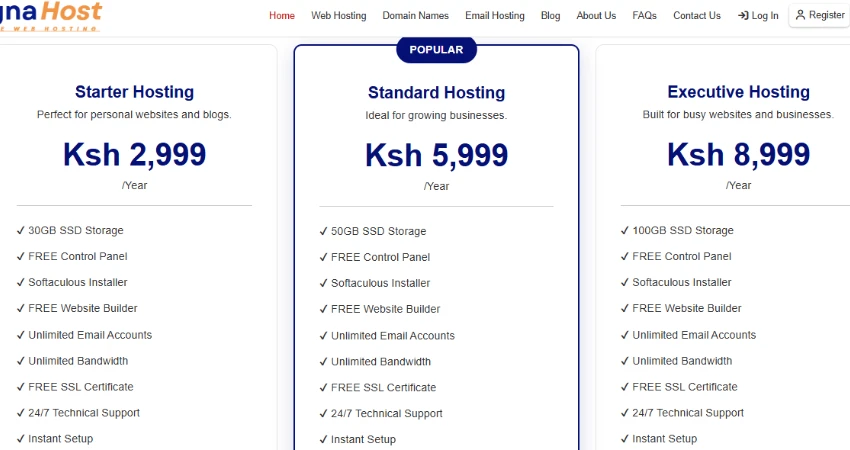
At Magna Host, the current annual hosting packages are:
| Hosting Package | Annual Price |
|---|---|
| Starter Hosting | KSh 2,999 |
| Standard Hosting | KSh 5,999 |
| Executive Hosting | KSh 8,999 |
All packages use DirectAdmin for hosting management.
Starter Hosting
Starter Hosting can be suitable for:
- New businesses
- Startups
- Small websites
- Blogs
- Personal websites
- Portfolios
Standard Hosting
Standard Hosting is intended for customers who need a larger hosting package for growing websites and increased requirements.
Executive Hosting
Executive Hosting is the largest of the three current packages and can be considered by customers whose websites require greater resources.
Choose the package that matches your requirements rather than automatically selecting the most expensive option.
Step 6: Connect Your Domain to Your Hosting
After purchasing both services, your domain needs to point to your hosting account.
This allows visitors who enter your domain to reach the website hosted on your server.
The technical process may involve updating DNS or nameserver settings.
If you are not familiar with DNS configuration, your hosting provider or website developer can assist you.
Step 7: Install or Upload Your Website
Once the domain and hosting are connected, you can put your website online.
There are several ways to do this.
Build With WordPress
WordPress can be used to create:
- Business websites
- Blogs
- Portfolio websites
- News websites
- Ecommerce websites
- Organisation websites
Magna Host also provides WordPress Hosting.
Upload a Custom Website
If your website has been developed using HTML, PHP or another supported technology, your website files can be uploaded to the hosting account.
Hire a Website Developer
If you do not have the technical skills or time to build the website yourself, you can work with a professional developer.
Magna Host also provides Website Design & Development Services.
Step 8: Create Professional Email
Once your domain is active, you can create professional email addresses based on your domain.
For example:
Professional email gives your business communication a consistent connection to your domain.
Magna Host provides Email Hosting for businesses and organisations.
Step 9: Secure Your Website
After launching your website, pay attention to security.
Important practices include:
- Use HTTPS
- Create strong passwords
- Keep website software updated
- Use trusted plugins and themes
- Limit administrator access
- Maintain backups
- Monitor your website
If you use WordPress, regularly update WordPress itself as well as your plugins and themes.
Step 10: Make Your Website Mobile-Friendly
Your website should work properly on smartphones and other mobile devices.
Test:
- Menus
- Buttons
- Contact forms
- Images
- Text
- Product pages
- Checkout pages
- Navigation
A visitor should not have to zoom in repeatedly or struggle to click important buttons.
Step 11: Add Your Business Information
Your website should clearly communicate what your business does.
At minimum, consider including:
Home Page
Explain your main offering and direct visitors towards important actions.
About Page
Tell visitors about your business.
Services Page
Explain your products or services.
Contact Page
Provide clear contact details.
Blog
Publish useful information related to your industry.
How Much Does a Domain and Hosting Cost in Kenya?
The total cost depends on the domain extension, hosting package and services you choose.
At Magna Host, hosting currently starts at:
KSh 2,999 per year
The other packages are:
Standard — KSh 5,999/year
Executive — KSh 8,999/year
Domain registration costs depend on the specific domain extension.
Your complete website budget may also include:
- Domain registration
- Hosting
- Website design
- Website development
- Professional email
- Content
- SEO
- Maintenance
Therefore, the cost of getting online can vary considerably depending on your requirements.
Can I Buy My Domain and Hosting From the Same Company?
Yes.
Buying domain registration and hosting from the same provider can make setup and management easier.
Instead of dealing with separate providers, you can manage important parts of your online presence from one account or company.
Magna Host provides:
- Web Hosting
- Email Hosting
- WordPress Hosting
- Domain Name Registration
- Website Design & Development
This gives customers access to several services required to establish and maintain a website.
What Should You Check Before Buying Hosting?
Before making a purchase, ask:
Does the package suit my website?
Understand your website's resource requirements.
Does it support my platform?
Check whether your preferred website technology is supported.
Is professional email available?
This is important for businesses that want domain-based email.
What control panel is provided?
Magna Host uses DirectAdmin.
Can I upgrade later?
Your website may grow, so consider future requirements.
What support is available?
Make sure you know how to obtain assistance when you encounter hosting-related issues.
Common Mistakes When Buying a Domain and Hosting
Choosing a Complicated Domain
A domain that is difficult to spell can make it harder for customers to find your website.
Buying Hosting Without Checking Requirements
Don't purchase a package before understanding what your website requires.
Choosing Only Based on Price
The cheapest package may not always provide the best value.
Forgetting Domain Renewal
Your domain needs to remain registered for your website to continue using it.
Ignoring Professional Email
A business website should ideally have professional communication connected to its domain.
Failing to Maintain the Website
Launching the website is only the beginning.
Regular updates, security checks and content improvements are important.
How to Buy Domain and Hosting From Magna Host
The process can be approached in a few simple stages:
1. Choose your domain name
Select a name that represents your business or project.
2. Search for availability
Check whether the desired domain is available.
3. Register the domain
Complete the domain registration process.
4. Select your hosting package
Choose Starter, Standard or Executive based on your requirements.
5. Connect the domain
Point the domain to your hosting account.
6. Build your website
Use WordPress, custom development or professional website design.
7. Create professional email
Set up domain-based email addresses.
8. Launch and promote
Publish your website and begin promoting it to your customers.
Why Choose Magna Host?
Magna Host provides an affordable way for Kenyan businesses and individuals to establish their online presence.
Its services include:
- Web Hosting
- Email Hosting
- WordPress Hosting
- Domain Name Registration
- Website Design & Development
Current hosting packages are:
| Package | Price |
|---|---|
| Starter | KSh 2,999/year |
| Standard | KSh 5,999/year |
| Executive | KSh 8,999/year |
All hosting packages use DirectAdmin.
Whether you are launching your first business website or expanding an existing online presence, you can select the services that match your requirements.
Frequently Asked Questions
Can I buy a domain without hosting?
Yes. Domain registration and web hosting are separate services. However, you will need hosting if you want to operate a conventional website.
Can I buy hosting without a domain?
Yes. You can purchase hosting separately and connect an existing domain to it.
How much is web hosting in Kenya?
Prices vary depending on the provider and package. Magna Host currently offers hosting from KSh 2,999 per year.
Which domain is best for a Kenyan business?
.co.ke is a popular choice for Kenyan businesses, while .ke and .com can also be considered depending on your brand and target market.
Do I need professional email?
Professional domain-based email is recommended for businesses because it connects communication to the business's domain.
Can I build my website after buying hosting?
Yes. After purchasing hosting and connecting your domain, you can build your website using WordPress, custom development or a website builder supported by your hosting environment.
Can Magna Host build my website?
Yes. Magna Host provides Website Design & Development Services in addition to hosting, email hosting, WordPress hosting and domain registration.
Final Thoughts
Buying a domain and web hosting is one of the first steps towards establishing a professional online presence.
The process can be summarised simply:
Choose a domain → Register it → Select hosting → Connect the domain → Build your website → Set up email → Launch.
The most important thing is to choose a domain that represents your brand and a hosting package that matches your current and future requirements.
For businesses, professionals, organisations and individuals looking for web hosting, domain registration, professional email, WordPress hosting or website development in Kenya, explore Magna Host and start building your online presence.

Magna Host Team
Magna Host Offers Fast, Secure, affordable and Reliable Web Hosting, Email Hosting and Domain Name Registration Services in Kenya.