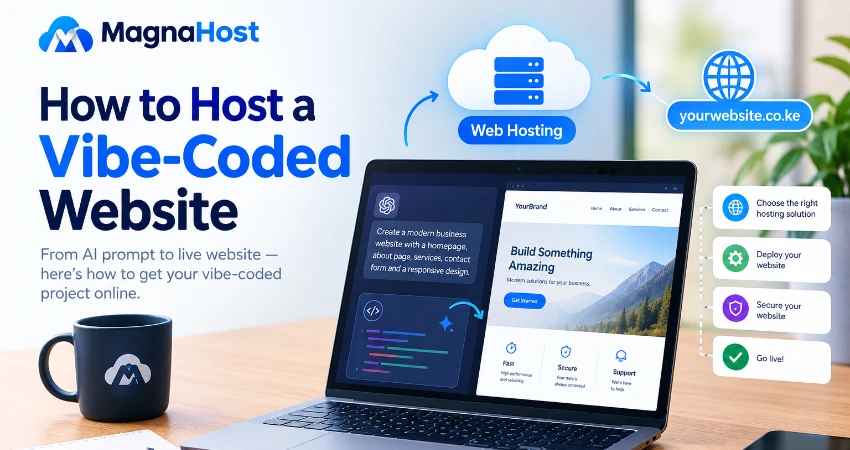
AI has changed how people build websites. Today, you can describe an idea to an AI tool, generate code, make a few adjustments and create a functional website without writing every line of code yourself. This approach is commonly known as vibe coding.
But building a website is only the first step. Once your AI-generated website is ready, you need somewhere to host it so that people can access it online.
Whether you have created a business website, a portfolio, a landing page or a small web application using AI, choosing the right hosting solution is essential. In this guide, we explain how to host a vibe-coded website, the hosting options available and what you should consider before publishing your project.
What Is a Vibe-Coded Website?
A vibe-coded website is a website or web application developed primarily through natural-language instructions to AI tools rather than traditional manual coding.
Instead of writing every HTML, CSS, JavaScript or PHP instruction yourself, you describe what you want to build. An AI coding tool generates the code, and you refine the result by providing further instructions.
Popular tools and platforms used for AI-assisted website development include ChatGPT, Claude, Google AI Studio, Lovable, Bolt and Replit.
For example, you could ask an AI tool to create a school website with an admissions page, a contact form, a news section and a responsive design. The tool can generate much of the code needed to build the website.
However, the resulting project may contain different technologies depending on the tool you use. Some projects consist of static HTML, CSS and JavaScript files, while others use React, Next.js, Node.js, PHP, databases or external APIs.
Understanding what your AI tool has generated is the first step towards choosing the correct hosting solution.
Why Does a Vibe-Coded Website Need Hosting?
Your AI tool may help you build the website, but the generated files do not automatically become a publicly accessible website.
Web hosting provides the infrastructure required to make your website available on the internet. Depending on your project, this may include web server software, storage, database services, application runtimes and security features.
Once your website is hosted, you can connect a domain name such as yourbusiness.co.ke or yourbusiness.com so that visitors can access it through a memorable web address.
A suitable hosting environment helps you:
- Publish your AI-generated website online.
- Connect a custom domain name.
- Serve website files to visitors.
- Run supported server-side code.
- Connect databases and application services where required.
- Manage website performance, backups and security.
The important point is that not every vibe-coded website can run on every type of hosting. Your choice depends on the technologies and features your project requires.
Step 1: Identify the Technology Used to Build Your Website
Before purchasing hosting, determine the type of website your AI tool has generated.
There are three common categories.
1. Static websites
A static website uses files such as HTML, CSS, JavaScript and images to display content in a browser. It does not require a server-side application to generate each page.
Examples include:
- Personal portfolios.
- Business landing pages.
- Product presentation websites.
- Simple company websites.
- Documentation pages.
These projects can often run on standard web hosting or static website hosting platforms.
2. Frontend frameworks such as React and Vue
Some AI tools generate websites using React, Vue or similar JavaScript frameworks.
These projects may require a build process that converts the source code into files suitable for deployment. If the website is a static frontend after building, it can often be hosted on standard web hosting.
Look for project instructions such as npm run build. The resulting output folder might be called dist, build or out, depending on the framework and configuration.
Do not upload the source folder blindly and expect it to work. Follow the deployment instructions for your particular project.
3. Full-stack web applications
Some vibe-coded projects include server-side functionality, authentication, databases, API endpoints or background processing.
Examples include:
- School management systems.
- Booking applications.
- Customer dashboards.
- Online marketplaces.
- Inventory management systems.
- Subscription-based web applications.
These projects may need a Node.js runtime, PHP support, a database or other application services. A static hosting plan alone may not be sufficient.
Before choosing a hosting package, identify the required runtime, database, environment variables and external services.
Step 2: Choose the Right Hosting Solution
Once you know how your project works, choose a hosting environment that supports its requirements.
Option 1: Shared web hosting
Shared hosting is often a practical and affordable option for static websites, business websites and supported PHP applications.
With a suitable shared hosting plan, you can upload your website files, connect your domain, enable SSL and manage your website through a hosting control panel.
It may be suitable if your vibe-coded website:
- Uses standard HTML, CSS and JavaScript.
- Is a static React or Vue build.
- Uses PHP for server-side functionality.
- Requires a database supported by the hosting package.
However, shared hosting does not automatically support every modern JavaScript framework or server-side runtime. Confirm Node.js availability and any relevant resource restrictions before choosing a plan.
For developers and businesses looking for affordable web hosting in Kenya, Magna Host offers hosting services that can be considered for projects compatible with its supported hosting environment.
Option 2: Static website hosting
Static hosting is designed for websites that can be served as prebuilt files without a continuously running application server.
It can be a good fit for landing pages, portfolios, documentation and many frontend projects.
Depending on the provider, features may include automatic deployment from a Git repository, preview deployments, CDN delivery and HTTPS.
However, server-side functionality such as authentication, database operations and API endpoints may need separate services.
Option 3: Cloud application hosting
Cloud application platforms can run applications that require Node.js, other supported runtimes, databases or background processes.
This can be appropriate for full-stack projects generated by AI coding tools.
Before selecting a provider, check its supported runtime versions, deployment process, resource limits, database options, pricing and backup arrangements.
Option 4: A virtual private server (VPS)
A VPS provides more control over the server environment and can be suitable for applications that require custom software, particular runtime versions or specific server configurations.
However, it also requires more technical knowledge. You may need to configure the operating system, web server, firewall, SSL certificates, application processes, monitoring and security updates.
A VPS is not automatically better for every project. For a simple static website, it may introduce unnecessary cost and administration.
Step 3: Prepare Your AI-Generated Website for Deployment
Before uploading your project, make sure it is ready for a production environment.
Start by checking that the website works locally and that its main features behave as expected.
Use this checklist:
- Test navigation links and page layouts.
- Check that the website works on mobile devices.
- Test forms, buttons and other interactive features.
- Resolve broken images, missing files and console errors.
- Confirm that the production build completes successfully.
- Check that the website uses the correct API URLs.
- Remove test data and unnecessary development files.
- Verify that secrets and private API keys are not exposed.
For JavaScript projects, follow the framework's documented build instructions. If the project produces a folder containing deployable HTML, CSS, JavaScript and other assets, that folder is often what you need to upload to static hosting.
Important: Never publish database passwords, private API keys, secret tokens or other credentials in frontend JavaScript. Browser-delivered code is visible to visitors. Sensitive values should be stored and used in a secure server-side environment.
Step 4: Upload Your Website to Your Hosting Account
If your project is compatible with standard web hosting, the next step is to upload the deployable files.
A typical workflow using a hosting control panel such as DirectAdmin is as follows.
1. Access your hosting control panel
Log in to your hosting account and open the control panel provided by your hosting company.
2. Open the file manager
Locate the document root for your domain. For many DirectAdmin configurations, the primary website's document root is the public_html directory.
The exact path can differ depending on your account and domain configuration.
3. Upload the website files
Upload the files produced by your website's build process or the static files supplied by your AI coding tool.
For a typical static website, the document root should contain an entry file such as index.html, together with the required assets and supporting files.
For a built React application, upload the contents of the generated output directory if that is what your deployment instructions specify.
Do not upload only the source files if the project requires a build step first.
4. Connect the domain
Make sure the domain points to the correct hosting account. Depending on your setup, you may need to update the domain's nameservers or DNS records.
DNS changes can take time to propagate.
5. Enable HTTPS
Enable an SSL/TLS certificate for your domain so that visitors can access your website securely over HTTPS.
If your hosting provider supports automated SSL certificate issuance, follow the instructions in your control panel.
6. Test the live website
Visit your domain and test the website as a normal visitor would.
Check the homepage, navigation, images, forms and any important interactive features. If the website uses a client-side router, configure the necessary rewrite rules so that supported routes load correctly.
Step 5: Configure the Backend and Database if Required
A common mistake when deploying an AI-generated website is assuming that uploading its frontend files will make the entire application work.
A frontend may depend on a separate backend to handle authentication, form submissions, payments, database operations or other sensitive tasks.
If your project has these dependencies, you must deploy and configure them as well.
For example, a school management application might contain:
- A React frontend.
- A Node.js backend.
- A PostgreSQL database.
- Authentication services.
- Email notifications.
Each component needs an appropriate hosting or service arrangement.
Before deployment, identify the required services and make sure they are configured to communicate securely. Set environment variables on the server, configure database access and restrict permissions to what the application actually needs.
If your AI tool has connected your project to a managed backend service, review that service's deployment instructions rather than assuming that the database is included in your web hosting package.
Step 6: Connect a Custom Domain Name
A custom domain makes your vibe-coded website easier to recognise and share.
For example, instead of relying solely on a temporary deployment URL, you could publish your project using a domain such as:
-
yourbrand.co.ke -
yourbrand.com -
yourbrand.org
Choose a domain that reflects your business, project or personal brand.
Once you have registered your domain, configure its DNS records according to your hosting provider's instructions. If you are using a separate backend or static deployment platform, your frontend and backend may require different DNS records.
You can explore domain registration options through Magna Host, which provides domain registration and web hosting services.
Step 7: Secure Your Vibe-Coded Website
AI-generated code should not automatically be treated as secure production code.
Although AI tools can speed up development, they can also produce incorrect assumptions, insecure configurations and code that has not been adequately tested.
Before launching a website that handles sensitive information or business operations, review the following areas.
Authentication and access control: Ensure users can access only the information and functions they are authorised to use.
Database security: Protect database credentials, restrict permissions and avoid exposing sensitive records through public API endpoints.
Input validation: Validate user-supplied information on the server, especially when handling forms, account registration and database operations.
Dependencies: Review third-party libraries and apply appropriate security updates.
API keys and secrets: Keep private credentials on the server or in the relevant secure secret-management system.
Backups: Establish a reliable backup process for website files, configuration and databases.
Monitoring: Monitor application errors, unusual activity and resource usage.
For projects that process payments, personal information or business-critical records, consider a professional security review before launch.
Common Mistakes to Avoid When Hosting a Vibe-Coded Website
Several deployment mistakes can cause a website to fail even when the AI-generated code appears to work correctly.
| Common mistake | How to avoid it |
|---|---|
| Uploading source code instead of the production build | Follow the framework's deployment instructions. |
| Choosing hosting that does not support the backend | Check runtime, database and application requirements before buying. |
| Forgetting environment variables | Configure production settings and secrets securely. |
| Exposing private API keys | Keep sensitive credentials out of browser-delivered code. |
| Ignoring application routing | Configure supported routes and rewrite rules correctly. |
| Using an incorrect API URL | Update development endpoints to the correct production endpoints. |
| Skipping security updates | Maintain dependencies and review security advisories. |
| Assuming hosting includes every external service | Check whether databases, email, storage and other services are included or billed separately. |
How Much Does It Cost to Host a Vibe-Coded Website?
The cost depends on the type of project, the hosting environment and the resources it requires.
A simple static website may have very low hosting costs, while a full-stack application with a database, background jobs and third-party integrations may require a larger budget.
Consider these cost categories:
- Domain name registration and renewal.
- Web hosting or application hosting.
- Database and file storage.
- Email delivery and other external APIs.
- Backups, monitoring and security services.
- Additional computing resources as traffic grows.
Do not choose a hosting provider based on the advertised price alone. Review the resources, technical requirements, renewal charges, backup arrangements and support options.
For a small business website or a static AI-generated project, compatible shared hosting may be a cost-effective starting point. More complex applications may need specialised application hosting or a VPS.
Why Consider Magna Host for Your Vibe-Coded Website?
Magna Host provides web hosting, email hosting, WordPress hosting, domain registration and website-related services for individuals and businesses in Kenya.
If you have used AI to build a website and want to bring it online, Magna Host can be an option for projects compatible with its hosting environment.
Our hosting plans use the DirectAdmin control panel, which provides tools for managing supported website files, domains, databases and other hosting features.
Before ordering, confirm that your project's technology stack is supported by the selected plan, particularly if it requires a Node.js runtime, a continuously running application process or specialised database services.
Explore our services at Magna Host and find a hosting solution suited to your website's requirements.
Final Thoughts
Vibe coding makes website development more accessible by allowing people to turn ideas into working software with the assistance of AI. However, generating the code is only one part of creating a successful online project.
You must also understand the technology your project uses, choose compatible hosting, deploy the correct files, configure the domain, protect sensitive information and test the live website.
For simple static websites and compatible PHP projects, standard web hosting can be an affordable way to get started. For applications that depend on specialised runtimes, databases or persistent backend processes, a suitable application hosting environment may be necessary.
Build with AI. Deploy with confidence. Choose hosting that fits your project.
Visit Magna Host to explore web hosting and domain registration services in Kenya.

Magna Host Team
Magna Host Offers Fast, Secure, affordable and Reliable Web Hosting, Email Hosting and Domain Name Registration Services in Kenya.